
Output Messenger1.0 - Download
You'll be able to download in few seconds.
Publisher Description
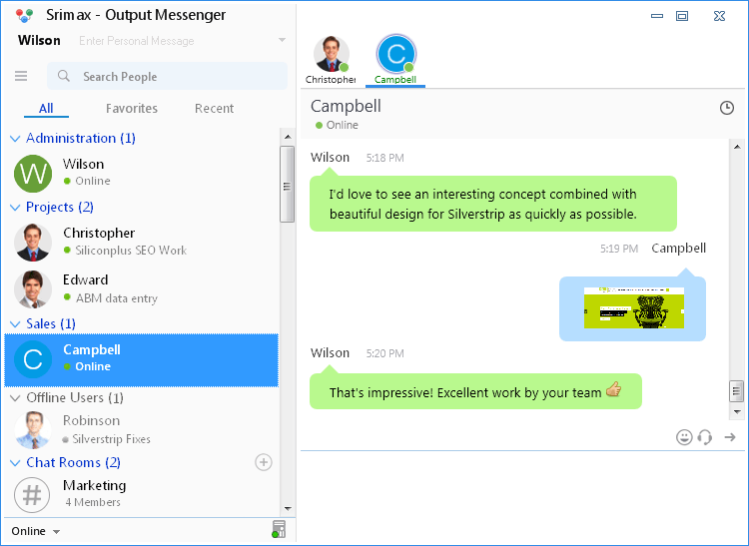
Give your team and employees the freedom to chat, talk, share and interact together from anywhere, on any device with Output Messenger, a new Secure and Private Office Communication Software designed specifically for keeping remote people and multiple offices in sync. Employees can manage Instant Messaging, Group Chat, Voice Chat, Video Chat, A/V Conferencing, File Transfer, Desktop Screen Sharing, Internal Mailing, Announcements all from one, easy-to-use program with a free accompanying app for computer, smartphone or tablet: Mac, Windows, Linux, Browser, Android, iPad or the iPhone. The software features are tailor made to improve collaboration between team members to work together more efficiently and productively. Ultimately, through the integration of this tool, you will see an increase in productivity in the workplace and raise the overall quality of work across the organization. Apart from the regular messaging functions the software offers rich options like Offline messaging, Off-the-Record Chat, Multiple Views, Chat Shortcuts, Preset Messages, Chat log, Cross-Platform Sync, Active Director Integration, API for 3rd part integration, Delivery notification, Push Notification for Mobile. The On-premise Chat Server appliance guarantees security, speed and flexibility in configuring, customizing and keep sensitive data within office environment. The use of TLS/SSL establishes a highly secure client-to-server connection to help provide data confidentiality and integrity between the client and the server. The software works within Office LAN, WAN, VPN, Multiple Sub Networks, Terminal Service and Internet. Both Client and Server applications are extremely easy to install and configure without the need for an onsite network administrator.
About Output Messenger
This Chat & Instant Messaging program is available in English. It was last updated on 29 September, 2026. Output Messenger is compatible with the following operating systems: Windows.
The company that develops Output Messenger is Srimax Software System Private Limited. The latest version released by its developer is 1.0.
The download we have available for Output Messenger has a file size of 8.4 MB. Just click the green Download button above to start the downloading process. The program is listed on our website since 2015-01-15 and was downloaded 0 times. We have already checked if the download link is safe, however for your own protection we recommend that you scan the downloaded software with your antivirus. Your antivirus may detect the Output Messenger as malware if the download link is broken.
How to install Output Messenger on your Windows device:
- Click on the Download button on our website. This will start the download from the website of the developer.
- Once the Output Messenger is downloaded click on it to start the setup process (assuming you are on a desktop computer).
- When the installation is finished you should be able to see and run the program.
Program Details
System requirements
Download information
Pricing
Version History
version 1.0
posted on 2015-01-15
- Single User Login with multiple devices
- Voice / Video / Desktop Sharing
- User Interface Changes
- Interactive Browser Version
- In Chat Window Log View & File Transfer Option
- Works only with Server. No P2P.
Disclaimer
External Download
We do not host Output Messenger on our servers. We did not scan it for viruses, adware, spyware or other type of malware. This app is hosted by the software publisher and passed their terms and conditions to be listed there. We recommend caution when installing it.
The external download link for Output Messenger is provided to you by apps112.com without any warranties, representations or guarantees of any kind, so access it at your own risk.
If you have questions regarding this particular app contact the publisher directly. For questions about the functionalities of apps112.com contact us.
